1.1 탐색적 데이터 분석의 과정
1. 데이터 정보 확인
- 데이터의 출처와 주제에 대해 이해
- 데이터의 크기
- 데이터의 구성요소(Feature)
2. 데이터의 속성 탐색
- Feature의 속성 탐색
- Feature 간의 상관관계 탐색
: 여러 개의 Feature 가 서로에게 미치는 영향력 파악. 공분산/ 상관계수와 같은 개념을 포함
3. 데이터 시각화
- 패턴/인사이트 도출
ex) 단순 수치적 자료만으로 Feature 간의 상관관계를 알 수 없고, 산점도를 통해 직관적으로 상관관계 파악
python-data-analysis/chapter1 at master · yoonkt200/python-data-analysis
<이것이 데이터 분석이다 - 파이썬 편, 한빛미디어>의 예제입니다. 독자 여러분의 의견을 수렴하여 상시 업데이트 진행중입니다. - yoonkt200/python-data-analysis
github.com
1.2 멕시코풍 프랜차이즈 chipotle의 주문 데이터 분석하기
1️⃣ 탐색: 데이터의 기초 정보 살펴보기
💠 데이터셋의 기초 정보 출력
- dataFrame.shape 함수: 행/열의 크기
- dataFrame.info() 함수: 행/열 구성정보 (행/열의 크기, 결측값(null) 유무, type)
import pandas as pd

df = pd.read_csv('chipotle.tsv', sep = '\t')
df.shape #(4622, 5)

df.info()
#return
<class 'pandas.core.frame.DataFrame'>
RangeIndex: 4622 entries, 0 to 4621
Data columns (total 5 columns):
 #   Column              Non-Null Count  Dtype
---  ------              --------------  -----
 0   order_id            4622 non-null   int64
 1   quantity            4622 non-null   int64
 2   item_name           4622 non-null   object
 3   choice_description  3376 non-null   object #결측값: 1,246 row (4,622-3,376)
 4   item_price          4622 non-null   object
dtypes: int64(2), object(3)  #숫자 2개, 문자열 3개
memory usage: 180.7+ KB
💠 데이터셋의 행/열/데이터 확인
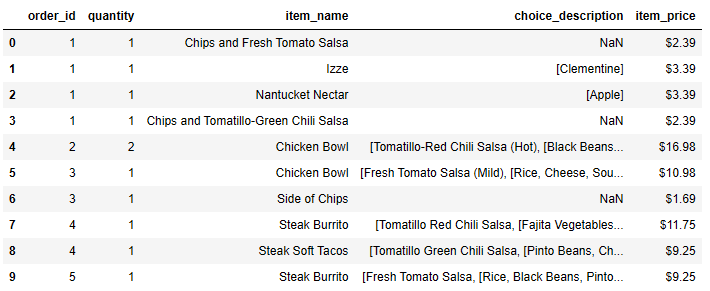
- dataFrame.head(N) 함수: 첫 N개의 데이터를 테이블 형태로 출력
- dataFrame.columns : 행의 목록
- dataFrame.index : 열의 목록
df.head(10)
df.columns
#return
Index(['order_id', 'quantity', 'item_name', 'choice_description','item_price'],
      dtype='object')


df.index
#return
RangeIndex(start=0, stop=4622, step=1)| column | name | |
| order_id | 주문 번호 | 범주 - 순서 (숫자의 의미를 가지지 않음) |
| quantity | 아이템의 주문 수량 | 수치 - 연속 |
| item_name | 주문한 아이템의 이름 | 범주 - 명목 |
| choice_description | 주문한 아이템의 상세 선택 옵션 | 범주 - 명목 |
| item_price | 주문 아이템의 가격 정보 | 수치 - 연속 |
> 데이터 전처리 작업 필요
item_price는 수치적 특성을 가지지만, 데이터셋에서 object 타입이기 때문에 데이터 전처리 작업이 필요함-> 3️⃣데이터 전처리 에서
💠수치형 데이터 - 기초 통계량 출력
- dataFrame.describe() 함수: 수치형 Feature 별 기초 통계량 출력

df.describe()
> 인사이트 도출
평균 주문 수량(quantity mean) 은 약 1.07
"한 사람이 같은 메뉴를 여러 개 구매하는 경우는 많지 않다"
- 단, 'order_id' 처럼 숫자의 의미를 가지지 않는 범주형도 출력은 되나 의미가 없기에 type 변경
# type 변경
df['order_id'] = df['order_id'].astype('str')
💠범주형 데이터 - 개수 출력 (중복 제외)
df['order_id'].nunique()   #1834
df['item_name'].nunique()  #50
2️⃣인사이트의 발견: 탐색과 시각화하기
> 인사이트를 더 많이 발견할 수 있는 질문을 탐색하며 시각화하기
💠가장 많이 주문한 아이템 Top10 출력
- dataFrame['col'].value_counts() 함수: value 별 개수 출력. Series 객체에만 적용

item_count = df['item_name'].value_counts()[:10]

for(idx, (val, cnt)) in enumerate(item_count.iteritems(), 1):
    print("Top", idx, ":", val, cnt)
💠아이템별 주문 개수와 총량
- dataFrame.groupby() 함수: 데이터 프레임에서 특정 Feature를 기준으로 그룹을 생성하며, 그룹별 연산을 적용
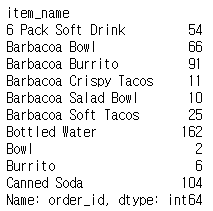
#아이템의 주문 개수
order_count = df.groupby('item_name')['order_id'].count()
item_count = df.groupby('item_name')['quantity'].count()

#아이템의 주문 총량
item_quantity = df.groupby('item_name')['quantity'].sum()
item_quantity[:10]
❔value_counts() / unique() 차이점
- 모두 Pandas의 Series 객체에서 사용할 수 있는 메서드이지만, 기능과 반환값이 다릅니다.
1. value_counts()
- 기능: Series 내에서 각 고유 값의 개수를 계산하여 반환합니다.
- 반환값: 값과 그 개수(counts)가 저장된 Series 객체 (내림차순 정렬)
- 예제:
출력:import pandas as pd s = pd.Series([1, 2, 2, 3, 3, 3, 4]) print(s.value_counts())3 3 2 2 1 1 4 1 dtype: int64
2. unique()
- 기능: Series에서 중복을 제거하고 고유한(unique) 값들을 반환합니다.
- 반환값: 고유 값들이 담긴 numpy.ndarray
- 예제:
출력:print(s.unique())[1 2 3 4]
주요 차이점 정리
기능 value_counts() unique()| 역할 | 값별 등장 횟수 계산 | 중복 제거한 고유 값 반환 |
| 반환 형식 | Series (값과 개수) | numpy.ndarray (고유 값 리스트) |
| 정렬 | 내림차순 정렬 | 원래 순서 유지 |
| 활용 예시 | 값의 분포 분석, 데이터 탐색 | 유효한 값 목록 확인 |
추가 예제: 비율 구하기
value_counts(normalize=True)를 사용하면 전체 개수 대비 각 값의 비율을 구할 수 있습니다.
print(s.value_counts(normalize=True))
출력:
3    0.428571
2    0.285714
1    0.142857
4    0.142857
dtype: float64
이와 달리 unique()는 단순히 고유한 값만 반환하므로, 비율을 구할 때는 적합하지 않습니다.
3️⃣ 데이터 전처리: 전처리 함수 사용하기
💠apply() 와 lambda를 이용해 데이터 전처리하기
- 'item_price'는 수치적 특성을 가지나 데이터셋 object type을 가지므로, 데이터 전처리가 필요

df['item_price_1'] = df['item_price'].apply(lambda x: float(x[1:]))
#다른 방법
# df['item_price'].str.replace("$","", regex=True).astype('float')

df['item_price_1'].dtype #dtype('float64')
4️⃣ 탐색적 분석: 스무고개로 개념적 탐색 분석하기
💠주문당 평균 계산금액 출력하기
- 주문(order_id)당 계산금액(item_price' sum)의 평균(mean)
df.groupby('order_id')['item_price_1'].sum().mean()
💠한 주문에 10달러 이상 지불한 주문 번호(id) 출력하기
orderid_group = df.groupby('order_id')['quantity','item_price_1'].sum();

results = orderid_group.loc[orderid_group['item_price_1'] >= 10,]
print(results[:10])
print(results.index.values) #['1' '10' '100' ... '997' '998' '999']
💠'Chicken Bowl'을 2개 이상 주문한 총 주문 수량 구하
df_chickenBowl = df.loc[df['item_name'] == 'Chicken Bowl',]
df_orderSum = df_chickenBowl.groupby('order_id')['quantity'].sum().reset_index()
df_result= df_orderSum.loc[df_orderSum['quantity'] >= 2,]
df_result.shape[0]
1.3 국가별 음주 데이터 분석하기
1️⃣ 탐색: 데이터의 기초 정보 살펴보기
💠 데이터셋의 기초 정보 출력
- dataFrame.info() 함수: 행/열 구성정보 (행/열의 크기, 결측값(null) 유무, type)
import pandas as pd
df = pd.read_csv('drinks.csv')
df.info()
#return
<class 'pandas.core.frame.DataFrame'>
RangeIndex: 193 entries, 0 to 192
Data columns (total 6 columns):
 #   Column                        Non-Null Count  Dtype
---  ------                        --------------  -----
 0   country                       193 non-null    object
 1   beer_servings                 193 non-null    int64
 2   spirit_servings               193 non-null    int64
 3   wine_servings                 193 non-null    int64
 4   total_litres_of_pure_alcohol  193 non-null    float64
 5   continent                     170 non-null    object  #결측값: 23 row (193-170)
dtypes: float64(1), int64(3), object(2)
memory usage: 9.2+ KB| column | name |
| country | 국가 정보 |
| beer_servings | beer 소비량 |
| spirit_servings | spirit 소비량 |
| wine_servings | wine 소비량 |
| total_litres_of_pure_alcohol | 총 알코올의 소비량 |
| continent |
국가의 대륙 정보 |
2️⃣인사이트의 발견: 탐색과 시각화하기
💠 Feature 간의 상관관계
- 상관관계를 살펴볼 대상: 'beer_servings', 'spirit_servings', 'wine_servings', 'total_litres_of_pure_alcohol'
- 술의 종류만 다를 뿐, 비슷한 의미를 가지는 Feature 이기 때문에 상관관계 확인
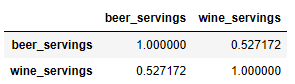
df[['beer_servings','wine_servings']].corr(method='pearson')
# 모든 Feature 들을 각각 1대 1로 비교
cols = ['beer_servings', 'spirit_servings', 'wine_servings', 'total_litres_of_pure_alcohol']

df[cols].corr(method='pearson')
3️⃣ 데이터 전처리: 전처리 함수 사용하기
💠 continent 에 존재하는 결측 데이터 처리
# 결측값 갯수 확인
df['continent'].isna().sum()

# 결측 데이터 처리 - fill
df['continent'] = df['continent'].fillna(value='OT')

# 'OT' 확인
df['continent'].value_counts()
4️⃣ 탐색적 분석: 스무고개로 개념적 탐색 분석하기
💠agg() 함수를 이용해 대륙별 'spirit_servings' 통계적 정보 확인
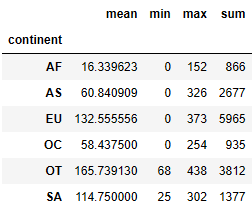
df.groupby('continent')['spirit_servings'].agg(['mean','min','max','sum'])

#수치적 정보
df.groupby('continent')['spirit_servings'].describe()
5️⃣통계적 분석: 분석 대상 간의 통계적 차이 검정하기
- 분석 결과에 타당성을 부여하기 위해 통계적으로 차이를 검정하는 과정이 필요
- 가장 기본적인 방법: t-test
.....ing
- 저자
- 윤기태
- 출판
- 한빛미디어
- 출판일
- 2020.02.10
'Data Science > 실습' 카테고리의 다른 글
| 이.데.분 03 - 예측분석 (0) | 2025.02.10 |
|---|---|
| pandas.Series.str 접근자와 정규표현식 (1) | 2025.02.03 |
| DataScience 예제 (1) | 2025.02.01 |
| 이.데.분 - 이것이 데이터 분석이다 with 파이썬 (0) | 2025.02.01 |
| KMeans와 Silhouette Score를 활용한 클러스터링 평가 (0) | 2024.12.14 |